verify.io
An AI generated content checker tool to increase AI literacy
Competed in INFO Challenge 2025
UI/UX
Competition


OVERVIEW
Info Challenge 2025 is an annual week-long challenge where college students from four Maryland academic institutions solve real-world problems in the areas of data analytics, security, and design.
One of the sponsors that offered a design challenge was Mindpetal, is a technology services provider specializing in advanced AI solutions for federal agencies. The company has a focus on empowering government leaders at organizations such as the Department of Homeland Security (DHS) and Department of Labor (DOL).
Mindpetal is now focused on creating creative and secure digital data and AI solutions for people to express themselves freely and creatively. Mindpetal wants to build tools that are knowledgeable and literate when related to AI generated content.
Role
Product Designer
Team
2 Product Designers
Tools
Figma
Google Forms
Notion
Skills
User Survey
Competitive Analysis
Secondary Research
User Personas
Timeline
March 1 - 8, 2025
Problem
As proposed by Mindpetal, the general population is finding it more and more difficult to identify what is or isn't AI generated content
Solution
Design an interface for an AI-generated content checker that will allow users to check if media is AI generated.
or more specifically,
How might we…
design a non-disruptive AI-generated content checker for a wide range of users across different age groups, so that they can seamlessly verify authenticity and gain trustworthy insights?
UNDERSTAND
Secondary Research
We dove into research articles and academic papers about how AI generated content is currently evaluated to properly understand the current landscape. We focused on current challenges for people when identifying AI generated content and how AI content evaluation can be improved.
Existing AI detection tools have much to improve on…
Although many detection tools exist, they don't include important features that users want to see. Although this can come down to technical feasibility, we found it important to consider anything that would improve the user experience. Our research showed that it was important for detection tools to prioritize:
1
Origin
An effective interface should clearly indicate the origin of the content
2
Evidence
The interface should offer evidence supporting its determinations to enhance user understanding and trust
3
Indicators
The interface should provide clear indicators or alerts when AI-generated content is detected
Conducting our own user survey allowed us to ask our own questions and tailor them to the tool we'd be designing. We conducted the survey within 2 days.
Our goal was to gauge familiarity with AI generated content, how people react when they are faced with AI generated content, and user preferences for an AI detection tool.
17
Responses
18-59
Age
Some notable responses:
Have you ever doubted the accuracy or trustworthiness of content you saw online?
88% of respondents have indicated "yes"
What factors, if any, would help you feel more confident in AI-generated results?
Citations or links to verified sources, transparency about AI’s accuracy, clear explanations about AI’s conclusions
What, if anything, would you do after seeing content flagged as AI-generated?
Majority of the respondents would feel more cautious before sharing or using the content and concerned about its accuracy
Respondents prefer a website extension or mobile application
When asked to rank the type of interface the AI detection tool should be, 6/17 respondents ranked mobile application as their first preference and 8/17 respondents ranked website extension as their number one. Mobile application was the most popular second choice.
SYNTHESIZE
Competitor Analysis
In order to correctly position ourselves in the current market, we compared desired features against existing detection tools.

User Personas
We stepped into the shoes of our tool’s prospective users to understand their pain points and needs. This helped us reach the conclusion that regardless of age and goals, people of all ages struggle with identifying AI generated content.


DESIGN
Chosen Interfaces
In order to mitigate user pain points and gaps in current products, we designed for 3 interfaces. With the focus on non-disruptiveness, seamlessness, and multimedia, we found that designing for both desktop and mobile would be the most effective in meeting user needs and mitigating pain points from the user survey.

Browser Extension
Balance privacy and non-disruptiveness
A browser extension would also allow the ability to check both images and text while on any given web page.
1
Clear instructions
Select text or screen element
Clear Call to Actions and highlighted actions
2
Probability of AI generation
Shows probability of AI generated content
Identifies content type
3
Content Accuracy
Quick preview
Detailed breakdown via website
Iterate from Low to High Fidelity

Initial
Ability to preview the content that the user has selected on the open web page. The original idea is that this would confirm what the user selected.

Final
After some discussion, we decided to forgo the preview feature as a user can already see what content they selected within the page itself, making the preview repetitive information.

Initial
Results page for non-text related media measuring how likely something is AI generated. We originally thought we would be measuring for how much of the content is AI generated rather than probability of it being AI generated. This would have been difficult to describe quantitatively.
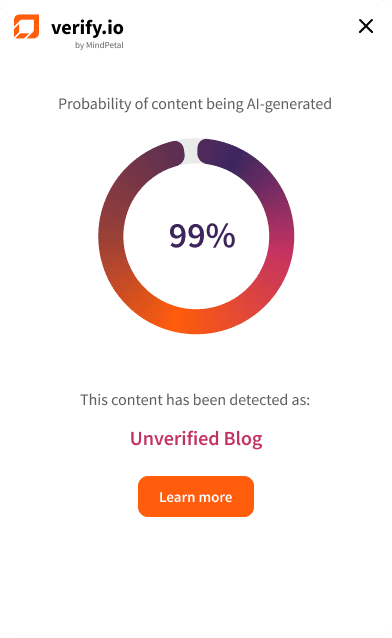
Final
We decided on communicating the probability that something is AI generated. Therefore, providing a percentage would work for both text and non-text content.

Mobile Widget
82% of respondents from the user survey interact with social media in their day to day
Looking back at the user survey, most users interact with AI generated content on their phones, so we found it imperative to make sure verify.io can help them there.
1
Non-Disruptive
Accessible at any point during a user’s phone usage
2
Convenience
Located in phone’s control center for easy swipe down
3
Content Accuracy
Quick preview
Detailed breakdown via website
Iterate again…

Initial
Explicitly tell the user to click on the notification to go to a full breakdown, alongside the open window icon. There is also not as much whitespace.

Final
The open window icon sufficiently communicates that clicking on the notification would redirect to a page where a user could view more information. Removing the text removes repetitive information. Additionally, making the logo and visual smaller allows for appealing whitespace.

Website
71% of respondents from the user survey want to see transparency about AI accuracy
Referring back to secondary and primary research, providing transparency on how the AI detection tool works and what's happening behind the scenes ensures credibility and trust from the user.
1
User Dashboard
Access past scans
Learn more about AI detection
2
Scan Breakdown
Short preview
Cited sources for accuracy
3
About Page
Explain how verify.io’s technology works
Simple instructions to use verify.io
FINAL PROTOTYPE
Browser Extension

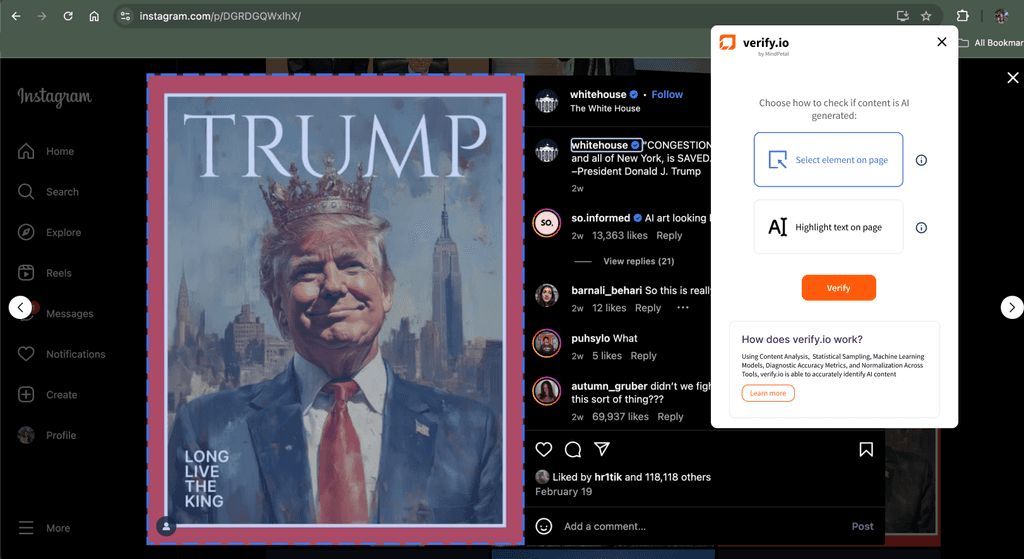
Choose whether to analyze text or specific element on a page, like an image (similar to a web browser's inspect tool)
Transparency: Encourage users to learn about verify.io's process by prompting them at the bottom
Transparency: Continue to provide user with information on what is happening behind the scenes


Visual and qualitative way of expressing the probability of content being AI generated
Links to sources to maintain transparency and accountability for content accuracy
Mobile Widget

Minimal Disruption: Easy access to widget in phone control center
The built-in widget will scan the current screen. In this case, verify.io is scanning a social media post.


Quick temporary preview of probability of content on screen is AI generated.
Call to action to view a more comprehensive report
Semi-permanent notification in control center allowing for a user to be redirected to website for full breakdown

Website
User Dashboard
A user would be able to access all their previous scans as well as manually input media to detect for AI.


Scan Breakdown
Includes content originally scanned, probability, sources, reasons for being flagged.
About Page
Includes how to use to use the extension and an explanation on what methods verify.io uses to detect AI generated content

TAKEAWAYS
This was the first time I've had the opportunity to do an end to end project within the short timeline of one week. Even more so, with only one other designer. It was especially exciting to compete alongside other students within the same challenge statement and see how every team approached it differently.
For the design process itself, we had to make the most of every day and strategically choose which user research methods we wanted to utilize and leave enough time for prototyping and iteration. One thing I would do differently is prioritize time for more user feedback rather than iterating internally and relying solely on the user surveys.
Shoutout to Hansika Murugu for being an amazing co-designer!!