winrock international

winrock international

winrock international

Converting rudimentary processes into internal dashboard

Converting rudimentary processes into internal dashboard

PRODUCT DESIGN

PRODUCT DESIGN

NON-PROFIT

NON-PROFIT

END-TO-END

END-TO-END

2025

2025

Role

Role

Role

Product Designer

Product Designer

Product Designer

Team

Team

Team

3 Product Designers

2 Product Managers

2 Tech Leads

8 Engineers

3 Product Designers

2 Product Managers

2 Tech Leads

8 Engineers

3 Product Designers

2 Product Managers

2 Tech Leads

8 Engineers

Tools

Tools

Tools

Figma
Notion

Slack

Figma
Notion

Slack

Figma
Notion

Slack

Skills

Skills

Skills

Wireframing

User Flow

Prototyping

Usability Testing

Wireframing

User Flow

Prototyping

Usability Testing

Wireframing

User Flow

Prototyping

Usability Testing

Timeline

Timeline

Timeline

January 2025 - Present

January 2025 - Present

January 2025 - Present

OVERVIEW

OVERVIEW

Winrock International is a nonprofit organization whose mission is to increase economic opportunity, sustain natural resources, and protect the environment. Winrock implements a portfolio of more than 100 agriculture, environment and social development projects across 140 countries and 5 program areas. They do this by assisting corporations in their ecological improvements/projects/plans. Winrock’s projects are focused on four main areas: agriculture, economic development, energy and environment, and human social capital.

Winrock International is a nonprofit organization whose mission is to increase economic opportunity, sustain natural resources, and protect the environment. Winrock implements a portfolio of more than 100 agriculture, environment and social development projects across 140 countries and 5 program areas. They do this by assisting corporations in their ecological improvements/projects/plans. Winrock’s projects are focused on four main areas: agriculture, economic development, energy and environment, and human social capital.

Winrock International is a nonprofit organization whose mission is to increase economic opportunity, sustain natural resources, and protect the environment. Winrock implements a portfolio of more than 100 agriculture, environment and social development projects across 140 countries and 5 program areas. They do this by assisting corporations in their ecological improvements/projects/plans.

Key Players: Clients, Suppliers, and the Winrock team

Key Players: Clients, Suppliers, and the Winrock team

Winrock acts as a third party for clients, working directly with their suppliers to go through the entire process of verifying carbon reduction activities. Clients often include companies like Nestle, and suppliers often include companies like Cargill.

Outdated processes ≠ Professional

Winrock currently validates suppliers' emission reduction activities for their clients by relying on basic Excel spreadsheets, personal note taking, and a general Asana board. This solution needs to be upgraded due to potential improvement in professionalism, security vulnerabilities, poor user experience, and Excel’s manipulation capabilities.

Winrock employees primarily utilize email to send back and forth Excel spreadsheets with suppliers and clients to collect information related to project proposals and risk and co-benefits

Winrock employees use email to send back and forth Excel spreadsheets with suppliers and clients to collect information related to project proposals and risk and co-benefits

Winrock employees keep personal notes about project updates and action items resulting in a very manual process

Winrock employees keep personal notes about project updates and action items resulting in a very manual process

The Winrock team utilizes Asana to track employee assignments and general project progress and doesn't include project specifics

The Winrock team utilizes Asana to track employee assignments and general project progress and doesn't include project specifics

How might we…

translate manual workflows into a centralized system encouraging professionalism, security, and maintains familiar functionality?

Solution

A professional web platform to simplify, organize, and review client and supplier form submissions as well as track project phases, with an improved UI and automated notifications for missing information and updates

UNDERSTAND

First, we dove into Winrock's verification process

First, we dove into Winrock's verification process

Alongside the PMs, we created a detailed user flow and refined it during early meetings with Winrock, asking a plethora of questions to make sure every part of their workflows were accounted for. Additionally, we found that each step in the verification process includes varying amounts of communication between Winrock and a supplier, as well as the need to send different documents/Excel sheets back and forth.

Alongside the PMs, we created a detailed user flow and refined it during early meetings with Winrock, asking a plethora of questions to make sure every part of their workflows were accounted for.

Determining key pain points:

Determining key pain points:

1

1

Lack of Efficiency in Communication

After form submission, Winrock often needs to follow up via email for missing or corrected information, leading to a time-consuming and error-prone back-and-forth process with suppliers

2

2

Lack of Reliability and Professionalism

The Excel-based setup may appear unprofessional or difficult to use, with fragile formulas and manual processes that lead to errors and limit scalability.

3

3

User Experience

The experience of filling out long Excel sheets is long and arduous resulting in an unpleasant user experience

DESIGN

Conceptualizing a dashboard that caters to Winrock's workflow

Conceptualizing a dashboard that caters to Winrock's workflow

With a solid understanding of Winrock's work flow, we were able to start put out initial ideas for interfaces. Our team of designers took inspiration from existing applications' features like Asana, Google suite, Qualtrics, Slack, and others. This way, we ensured we weren't reinventing the wheel but instead tailoring working designs to this project's needs.

Dashboard: Big filters, sort, filter by, and search features to sift through all projects

Project View (Idea #1): Upon clicking a project from the dashboard, a user can view project information and each stage in Winrock's process

Project View (Idea #2): Be able to converse with suppliers/clients directly within the web application

Project View (Idea #2 continued): Click through project stages via tabs while viewing all documents at any time

Iterate Iterate Iterate!

Iterate Iterate Iterate!

Based on specific information provided by Winrock including all necessary project properties, sort options, and filter options, we organized the dashboard so that employees could view projects accordingly

Defining Main Filters

Instead of status (Active, In progress, etc.), Winrock preferred it so that the main tab filters relate to "Activity Type" because specific Winrock employees work on each type

Before

After

KPI Visualizations

Originally, Winrock was interested in a KPI page that would display big picture metrics. However, upon further exploration, the team realized that there wasn't enough for a whole page and that the application was quickly resembling Winrock's internal Asana board.


As a fix, we added visualizations of the main KPIs as a collapsible dropdown on the dashboard page.

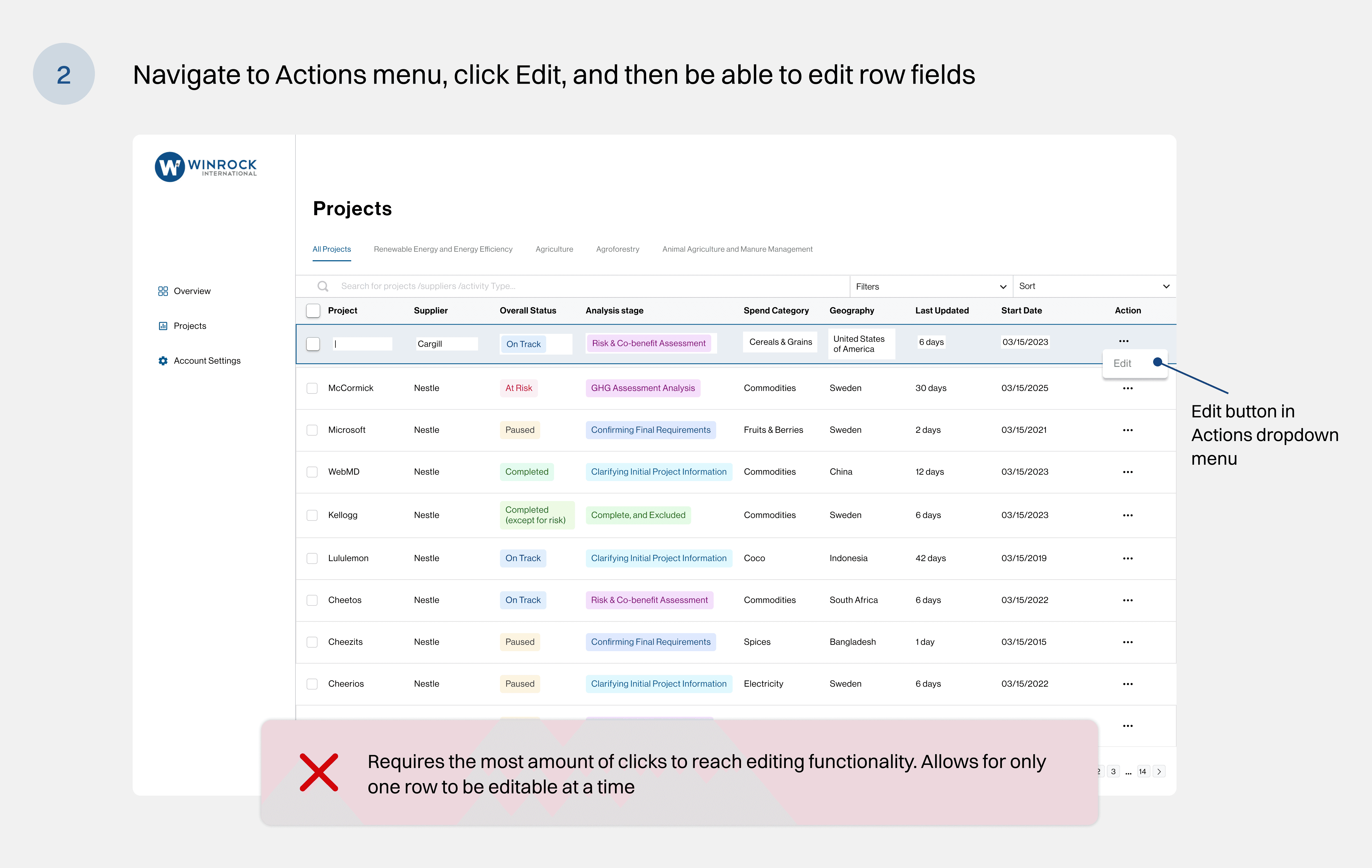
Mass vs Singular Actions

Mass vs Singular Actions

In order to edit the properties of a project, we needed to decide the best method to do so. We proposed 3 solutions to Winrock by discussing standard actions they would take when navigating the dashboard.

Maintaining component states

Maintaining component states

To create interactive prototypes to demo and simulate feature functionality, we maintained a design system consisting of repeating components. Any changes made would propagate to all designs.

Validating progress with the Winrock team

At the end of the semester, we tested our prototype with 3 Winrock employees who hadn’t engaged with the designs previously. I created an interactive prototype in Figma with key interactions to allow for users to play around with the features.

Usability testing with the Associate Director of Sustainability Services at Winrock International

“ These sorting options are perfect—this is exactly what I’m used to in tools like Excel and Teams, and it’s very helpful. ”

Technical Specialist in Sustainability Services

“ This is a clean management system where you’re able to follow things intuitively so that’s really nice ”

Associate Director of Sustainability Services

Validating progress with the Winrock team

At the end of the semester, we tested our prototype with 3 Winrock employees who hadn’t engaged with the designs previously. I created an interactive prototype in Figma with key interactions to allow for users to play around with the features.

Usability testing with the Associate Director of Sustainability Services at Winrock International

“ These sorting options are perfect—this is exactly what I’m used to in tools like Excel and Teams, and it’s very helpful. ”

Technical Specialist in Sustainability Services

“ This is a clean management system where you’re able to follow things intuitively so that’s really nice ”

Associate Director of Sustainability Services

FINAL PROTOTYPE

Filter, Search, Sort

Filter, Search, Sort

Instead of sifting through spreadsheets to find specific information, the dashboard allows Winrock employees to instantly filter by categories such as project status and sort by various date and supplier name options.

Instead of sifting through spreadsheets to find specific information, the dashboard allows Winrock employees to instantly filter by categories such as project status and sort by various date and supplier name options.

Archived Projects

Archived Projects

Provides a clean way to organize projects creating a focused dashboard for current work while keeping archived projects separate, which improves team efficiency by reducing visual clutter.

Provides a clean way to organize projects creating a focused dashboard for current work while keeping archived projects separate, which improves team efficiency by reducing visual clutter.

Edit Dashboard

Edit Dashboard

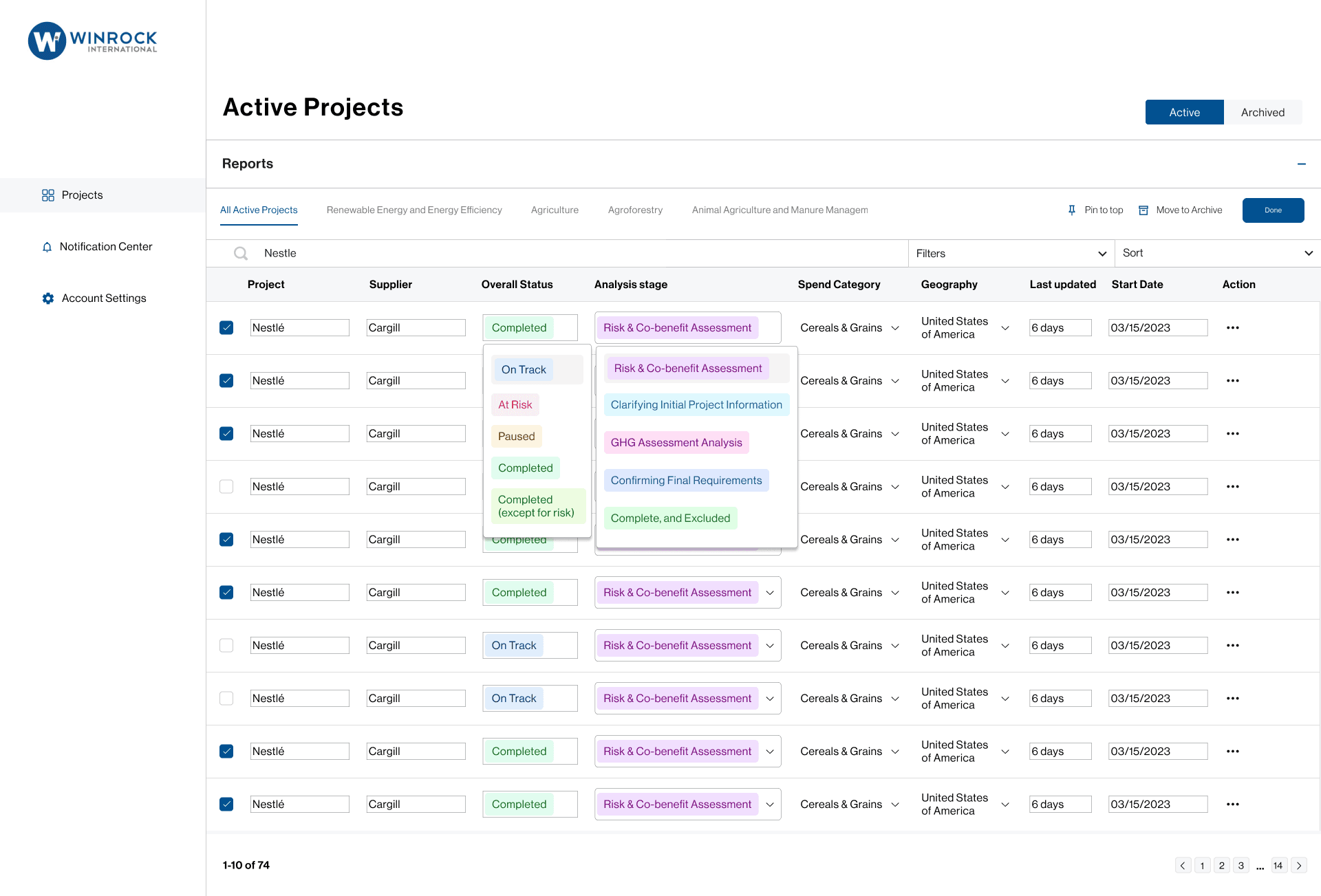
One edit button allows to edit multiple project properties at once, including name, last updated, and stages. This allows Winrock employees complete control over information

One edit button allows to edit multiple project properties at once, including name, last updated, and stages. This allows Winrock employees complete control over information

Project View Page

Project View Page

View project information and stage tracker including directly embedded communication

View project information and stage tracker including directly embedded communication

Access Management

Access Management

Makes it easy to add people to a project. Previously shared project forms and updates via email, which made it difficult to keep track of which clients and suppliers had access. Displays an autocomplete menu of other users and protect against errors

Makes it easy to add people to a project. Previously shared project forms and updates via email, which made it difficult to keep track of which clients and suppliers had access. Displays an autocomplete menu of other users and protect against errors

Notification Center

Notification Center

Saves employees from the hassle of back-and-forth emailing by providing a central location for all project updates. Employees can easily flip between read, unread, and all notifications to stay on top of everything.

Saves employees from the hassle of back-and-forth emailing by providing a central location for all project updates. Employees can easily flip between read, unread, and all notifications to stay on top of everything.

TAKEAWAYS

Stakeholder Collaboration

Stakeholder Collaboration

By checking in weekly with Winrock, we were able to design and define every feature each week while getting iterative feedback to keep improving our designs and ensure that every change directly reflected what Winrock needed.

Cross-Functional Team

Cross-Functional Team

Working with a mostly technical team, it was important for the designers to clearly explaining designs and hand off organized Figma designs. Dropping comments, having slack conversation, and touching base at weekly meetings was integral to team success.

Design Ownership

Design Ownership

Building a design from scratch encouraged me as a designer to be confident in the design decisions we made and back it up with design principles.

Lead Role

Lead Role

Within the design team, I took the initiative to coordinate agendas for design sessions, help lead conversations in client calls, be the point of contact when collaborating with engineers, and delegate weekly tasks.